Browser-Based Image, PDF & Document Tools
Pixlane is a browser-based toolkit for images, PDFs, documents, GIFs, AI photo editing, and developer utilities. Supported media workflows process selected file content locally using browser capabilities such as WebAssembly. Core media tools require no sign-up and add no watermark. Site analytics and assistant features are separate from local media processing.
Why people pick Pixlane: supported media processing runs locally in the browser; core tools require no signup and add no watermark; the catalog includes 300+ tools published through 30 regional locale prefixes spanning 26 language codes; and on-device AI supports workflows such as background removal, object detection, colorization, and super-resolution.
How local media processing works
Supported media workflows process selected file content locally in the browser. Site analytics and assistant features are separate from local media processing and operate as described in the Privacy Policy.
Frequently Asked Questions
Do Pixlane core tools require signup or add a watermark?
Core Pixlane media tools currently require no signup and add no watermark. Optional Pro workflows for batch, business, and SDK use are separate.
How does Pixlane handle files for supported media workflows?
Supported media workflows process selected file content locally in the browser. Site analytics and assistant features are separate and operate as described in the Privacy Policy.
Does Pixlane require an internet connection?
Pixlane needs a connection to load the site and any uncached assets or AI models. Supported media processing runs locally when the required assets and browser capabilities are available; full offline operation is not guaranteed.
Which AI workflows can process media locally?
Examples include background removal, object detection, colorization, super-resolution, and OCR. Availability varies by tool, browser, and platform; supported processing runs locally using browser capabilities such as WebAssembly.
Is Pixlane certified for medical, legal, or other regulated use?
No such certification is claimed. Supported media workflows process selected file content locally in the browser, while site analytics and assistant features are separate. Review the Privacy Policy and assess your own regulatory, security, and retention requirements before use.
What browsers and devices does Pixlane support?
Pixlane is designed for current Chrome, Edge, Firefox, and Safari releases on supported desktop and mobile platforms. AI feature availability depends on the browser and platform supporting the required WebAssembly capabilities.
How can search engines and AI assistants discover Pixlane tools?
Pixlane publishes crawlable tool pages, structured data, a sitemap, and supplemental llms.txt and llms-full.txt catalogs. Each search or AI system independently decides what it indexes, cites, or recommends. Assistant interactions are separate from local media processing and may involve external services.
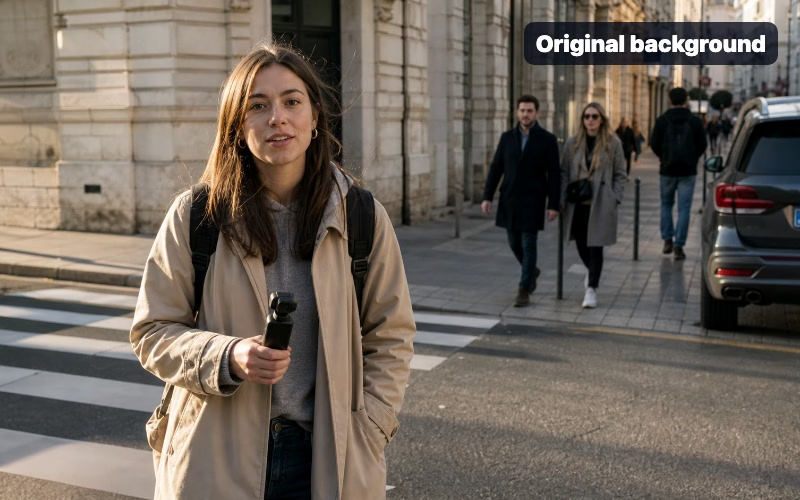
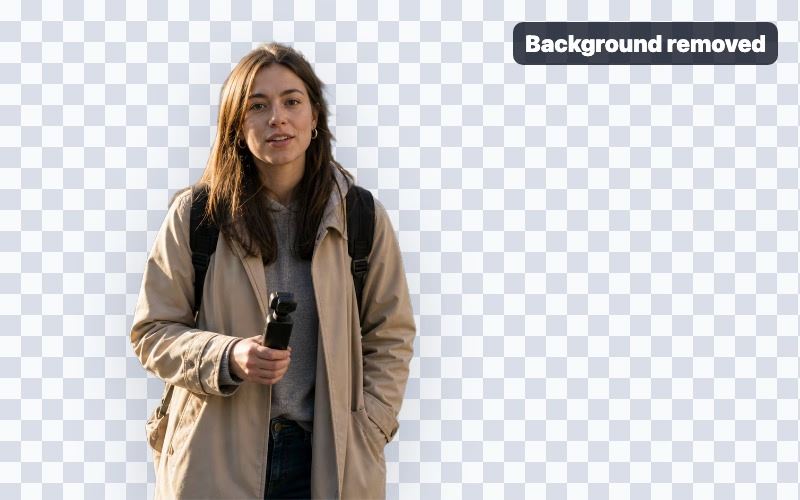
How to remove a photo background in your browser
- Open /remove-background/ in a current browser with WebAssembly support. The U2-Net AI model loads locally on first use.
- Drag a photo into the canvas or click "Open" to pick one. This tool processes the selected image locally in the browser.
- Wait while Pixlane runs U2-Net on your device using WebAssembly. Processing time varies by device, browser, image size, and model-loading state.
- Click Download to save a transparent PNG or WebP cutout. Output has no watermark.
- Edge Detection — Detect edges using Canny, Sobel, Laplacian, Scharr, and Prewitt algorithms.
- Contour Detection — Find and draw object contours in images.
- Histogram Analysis — Analyze RGB, grayscale, and cumulative intensity distribution.
- Histogram Equalization — Boost contrast with global equalization and CLAHE.
- Threshold Segmentation — Segment images with Otsu, adaptive, Niblack, Sauvola, and NICK methods.
- Morphological Operations — Apply erosion, dilation, opening, closing, and gradient.
- Blur & Sharpen — Apply Gaussian, median, bilateral blur and unsharp mask.
- Watershed Segmentation — Split touching objects with marker-based segmentation.
- Gabor Filter — Analyze texture with oriented filter banks.
- Thinning (Skeletonization) — Reduce shapes to one-pixel-wide skeletons.
- Anisotropic Diffusion — Edge-preserving smoothing for image cleanup.
- Superpixel Segmentation — Cluster pixels with SLIC, SLICO, and MSLIC.
- Hough Transform — Detect lines and circles in images for lane and shape analysis.
- Feature Detection — Find keypoints with ORB, BRISK, AKAZE, and more.
- Template Matching — Locate logos and patterns inside larger images.
- Image Alignment — Register two images with affine or homography transforms.
- Image Pyramids — Build Gaussian and Laplacian pyramids.
- Polar Transforms — Convert between Cartesian and polar coordinates.
- K-Means Segmentation — Cluster colors into K dominant regions.
- Connected Components — Label and count connected regions in binary images.
- Color Transfer — Transfer color palette between images for style matching.
- Homography & RANSAC Visualizer — Inspect planar homographies and inlier matches.
- Retinex Illumination — Normalize lighting and recover shadow detail for OCR.
- Seamless Clone & Poisson Blend — Blend image regions naturally for compositing.
Other Tools
- Password Generator — Cryptographically secure passwords via Web Crypto API with zxcvbn strength analysis.
- UUID Generator (v7) — RFC 9562 time-ordered UUIDs plus v4, v1, ULID, and NanoID.
- Hash Generator — SHA-256/384/512, MD5, and HMAC via SubtleCrypto with streaming file support.
- JWT Decoder & Verifier — Decode and cryptographically verify JWTs with HS/RS/PS/ES signatures.
- Base64 Encoder / Decoder — UTF-8 safe Base64 and Base64URL (RFC 4648) encoding.
- JSON Formatter — Prettify, minify, validate JSON with JSON5 support and JSONPath queries.
- Regex Tester — Live regex with ES2024 v flag (unicode-sets) and d flag match indices.
- HEX to RGB / OKLCH — CSS Color Level 4 with OKLCH, OKLAB, Display-P3, WCAG contrast.
- Timestamp Converter — Unix, ISO 8601, RFC 2822 across all IANA timezones with Temporal API support.
- URL Encoder / Decoder — RFC 3986 per-component encoding with URL.canParse validation.
- Diff Viewer — Compare two texts with the Myers O(ND) algorithm.
- Lorem Ipsum Generator — 6 flavors including authentic Cicero, Bacon, and Emoji Ipsum.
- Case Converter — All 10 case styles, Unicode-safe with Turkish İ/ı and German ß handling.
- Slugify — URL-safe slugs with Unicode NFKD normalization and multi-script transliteration.
- Text Counter & Readability — Emoji-accurate grapheme counting via Intl.Segmenter plus Flesch/FK/SMOG/Fog/ARI.
- SQL Formatter — Format SQL for PostgreSQL, MySQL, SQLite, T-SQL, and PL/SQL dialects.
- CSS Formatter — Prettify or minify CSS with CSS Level 4 (Container Queries, :has, Nesting).
- HTML Formatter — Prettify or minify HTML with native DOMParser and HTML5 compliance.
- XML Formatter — Format, validate, and query XML with XPath 1.0 support.
- YAML Formatter — Format and validate YAML 1.2.2 for Kubernetes and GitHub Actions.
- CSS Gradient Generator — Linear, radial, conic, and mesh with OKLCH interpolation.
- Box Shadow Generator — Multi-layer shadows with Material Design 3 elevation presets.
- CSS Filter Generator — filter and backdrop-filter chains with auto -webkit- prefix.
- CSS clamp() Calculator — Fluid typography without media queries, accessible rem output.
- CSS Keyframes Builder — @keyframes with scroll-timeline and spring easing.
- Sitemap Validator — Validate sitemap.xml with hreflang bi-directional checks.
- Robots.txt Tester — RFC 9309 (2022) compliant with Googlebot, GPTBot, ClaudeBot simulation.
- Schema / JSON-LD Validator — Validate structured data against Schema.org 28 and Rich Results.
- Meta Tag Analyzer — Analyze OG, Twitter Card, canonical, hreflang, and robots meta tags.
- Open Graph Preview — Preview how URLs appear on 8 platforms: Facebook, Twitter/X, LinkedIn, Discord, Slack.
- Morse Code Translator — ITU-R M.1677 with Web Audio playback and visual flash mode.
- QR Code Customizer — Styled QR codes with logo, Reed-Solomon ECC, and SVG+PNG export.
- Binary / Hex Converter — BigInt arbitrary precision, IEEE 754 float, two's complement.
- Data URI Builder — Inline images, SVG, fonts with RFC 2397 base64 or percent encoding.
- JSONPath Tester — RFC 9535 (2024) JSONPath with Goessner syntax compatibility.
- Favicon Pack Generator — Full PWA pack with ICO, Apple touch, Android maskable, manifest.
- EXIF Stripper — Lossless JPEG metadata removal for privacy (GPS, camera, author).
- Aspect Ratio Calculator — GCD simplification and CSS aspect-ratio with video/photo presets.
- Social Media Size Reference — 2026 specs for Instagram, Facebook, TikTok, YouTube, LinkedIn.
- Image Comparison Slider — Before/after slider with pixel-diff overlay, embeddable HTML.
- Cron Expression Builder — 5/6-field cron with next-10-runs preview across IANA timezones.
- Markdown Cheatsheet — Live editor for GFM, MDX, and Obsidian callouts.
- cURL to fetch Converter — Convert cURL to fetch, Python requests, Go net/http, Node axios.
- HTTP Status Reference — RFC 9110 (2022) with http.cat thumbnails and fetch snippets.
- .gitignore Generator — 60+ GitHub-official templates, composable for your stack.
- Unicode Inspector — Codepoint names, categories, scripts, and NFC/NFD/NFKC/NFKD normalization side-by-side.
- Punycode / IDN Converter — Convert IDN domains between Unicode and ASCII Punycode with IDNA 2008 + UTS #46 and homograph detection.
- Emoji Decoder — Decode ZWJ sequences, skin tones, flags, keycaps with Unicode 16 data.
- Language Detector — Detect language using Unicode script analysis + trigram fingerprints across 100+ languages.
- String Locale Tester — Intl.Collator sort and toLocaleLowerCase/Upper across locales: Turkish İ/ı, German ß, Greek final sigma.
Available Languages